ADHD-friendly multi-user todo list. Fast capture, smart views, reminders via email and Web Push — all on a single Postgres + Go + React stack.
Features
Task Management
-
Smart views — Today, Upcoming, Overdue, Done, and per-category
-
Overdue section — past-deadline tasks surface in a collapsible section at the bottom of Today; they are never lost and never clutter the main list
-
Snooze — reschedules the deadline to a future date without hiding or archiving the task; it reappears in Today or Upcoming on the new date
-
Priority levels — None / Low / Medium / High with colour-coded left border on every task card
-
Categories — colour-tagged groupings with dedicated per-category views; deleting a category leaves its tasks intact
Capture and Input
-
Quick Capture bar — inline text input at the top of every list view; press Enter to create instantly, no form required
-
Reschedule presets — Tomorrow / Weekend / Next week pills above the date picker for one-click rescheduling
Reminders
-
Email — scheduled via the built-in River job queue (no Redis required)
-
Web Push — browser push notifications using VAPID; no third-party service
-
Both channels fire from the same reminder job; failures on one channel do not cancel the other
Admin
-
User management — list all registered users, change roles (user ↔ admin), and delete accounts from a dedicated dashboard
-
Disable sign-up — toggle registration on/off at runtime without restarting the server; the setting persists in the database
-
Self-protection — admins cannot demote or delete their own account
UX Details
-
Today progress counter — shows "X tasks" that becomes "X / Y done" as you complete work
-
Overdue badge — live count in the sidebar so the backlog is always visible
-
Completion animation — brief ring + checkmark when a task is marked done
-
Default reminder — Quick Capture and the form sheet both pre-fill reminder to one hour from now; clear it before saving if not needed
ADHDoIt — Product Specification
Repository Layout
adhdo-it/
├── CLAUDE.md
├── compose.yml
├── .env.example
├── backend/
│   ├── Dockerfile
│   ├── go.mod / go.sum
│   ├── cmd/server/main.go        ← entrypoint; starts HTTP server + River worker
│   └── internal/
│       ├── config/               ← env var loading
│       ├── db/                   ← sqlc generated code
│       │   ├── migrations/       ← golang-migrate SQL files
│       │   ├── queries/          ← .sql query files for sqlc
│       │   └── sqlc.yaml
│       ├── handler/              ← HTTP handlers, one file per resource
│       ├── middleware/           ← auth, logging, CORS
│       ├── model/                ← shared domain types
│       ├── notification/         ← SMTP + webpush dispatch
│       ├── worker/               ← River job definitions
│       └── server/               ← chi router setup
└── frontend/
    ├── Dockerfile
    ├── Caddyfile                 ← baked into frontend image
    ├── vite.config.ts / tsconfig.json / tailwind.config.ts
    └── src/
        ├── routes/
        │   ├── __root.tsx
        │   ├── login.tsx / register.tsx
        │   ├── auth/
        │   │   └── callback.tsx      ← OAuth2 callback (reads hash fragment)
        │   └── app/
        │       ├── __layout.tsx
        │       ├── today.tsx / upcoming.tsx / overdue.tsx / done.tsx
        │       └── category.$id.tsx
        ├── components/
        │   ├── TodoItem.tsx / TodoList.tsx / TodoFormSheet.tsx
        │   ├── QuickCapture.tsx / CategoryBadge.tsx / AppShell.tsx
        ├── api/                  ← TanStack Query hooks + fetch wrappers
        │   ├── client.ts / todos.ts / categories.ts / auth.ts
        ├── store/                ← Zustand: auth token, UI state
        └── lib/
            ├── utils.ts          ← cn(), date helpers
            └── sw.ts             ← service worker registration for Web Push
Tech Stack
Backend
| Concern | Package |
|---|---|
HTTP router |
|
CORS |
|
DB driver |
|
Query gen |
|
Migrations |
|
Auth / JWT |
|
OAuth2 / GitHub SSO |
|
Password |
|
Job queue |
|
Web Push |
|
Validation |
|
Env |
|
UUIDs |
|
Logging |
|
Frontend
| Concern | Package |
|---|---|
Framework |
React 18 + Vite + TypeScript |
UI |
shadcn/ui (Radix UI + Tailwind CSS v4) |
Data fetching |
|
Routing |
|
Forms |
|
Dates |
|
State |
|
Icons |
|
Environment Variables
DATABASE_URL=postgres://adhdo:secret@db:5432/adhdo?sslmode=disable
JWT_SECRET=change-me-32-chars-minimum
JWT_ACCESS_TTL=15m
JWT_REFRESH_TTL=30d
PORT=8080
ENVIRONMENT=production            # or development
DOMAIN=localhost
SMTP_HOST=smtp.example.com
SMTP_PORT=587
SMTP_USER=noreply@example.com
SMTP_PASSWORD=
SMTP_FROM=ADHDoIt <noreply@example.com>
VAPID_PUBLIC_KEY=
VAPID_PRIVATE_KEY=
VAPID_SUBJECT=mailto:admin@example.com
VITE_API_BASE_URL=/api/v1
VITE_VAPID_PUBLIC_KEY=
# GitHub OAuth2 SSO (optional)
GITHUB_CLIENT_ID=
GITHUB_CLIENT_SECRET=
GITHUB_REDIRECT_URI=http://localhost:8080/api/v1/auth/github/callback
FRONTEND_URL=http://localhost:5173
VITE_GITHUB_AUTH_ENABLED=false
Load with godotenv.Load() only when ENVIRONMENT != production.
FRONTEND_URL is the origin the backend redirects to after a successful OAuth callback.
Set to http://localhost:5173 for local dev; leave empty in production (Caddy serves both on the same origin).
|
Database Schema
000001_init.up.sql
CREATE EXTENSION IF NOT EXISTS "pgcrypto";
CREATE TYPE todo_status AS ENUM ('active', 'snoozed', 'done');

CREATE TABLE users (
    id            UUID PRIMARY KEY DEFAULT gen_random_uuid(),
    email         TEXT NOT NULL UNIQUE,
    password_hash TEXT NOT NULL,      -- empty string for SSO-only accounts
    name          TEXT NOT NULL,
    timezone      TEXT NOT NULL DEFAULT 'UTC',
    created_at    TIMESTAMPTZ NOT NULL DEFAULT NOW(),
    updated_at    TIMESTAMPTZ NOT NULL DEFAULT NOW()
);

CREATE TABLE refresh_tokens (
    id         UUID PRIMARY KEY DEFAULT gen_random_uuid(),
    user_id    UUID NOT NULL REFERENCES users(id) ON DELETE CASCADE,
    token_hash TEXT NOT NULL UNIQUE,
    expires_at TIMESTAMPTZ NOT NULL,
    created_at TIMESTAMPTZ NOT NULL DEFAULT NOW()
);
CREATE INDEX ON refresh_tokens(user_id);
CREATE INDEX ON refresh_tokens(expires_at);

CREATE TABLE categories (
    id         UUID PRIMARY KEY DEFAULT gen_random_uuid(),
    user_id    UUID NOT NULL REFERENCES users(id) ON DELETE CASCADE,
    name       TEXT NOT NULL,
    color      TEXT NOT NULL DEFAULT '#6366f1',
    created_at TIMESTAMPTZ NOT NULL DEFAULT NOW()
);
CREATE INDEX ON categories(user_id);

CREATE TABLE todos (
    id           UUID PRIMARY KEY DEFAULT gen_random_uuid(),
    user_id      UUID NOT NULL REFERENCES users(id) ON DELETE CASCADE,
    category_id  UUID REFERENCES categories(id) ON DELETE SET NULL,
    title        TEXT NOT NULL,
    description  TEXT,
    deadline     DATE NOT NULL,
    reminder_at  TIMESTAMPTZ,
    priority     SMALLINT NOT NULL DEFAULT 0 CHECK (priority BETWEEN 0 AND 3),
    status       todo_status NOT NULL DEFAULT 'active',
    snooze_until DATE,
    done_at      TIMESTAMPTZ,
    created_at   TIMESTAMPTZ NOT NULL DEFAULT NOW(),
    updated_at   TIMESTAMPTZ NOT NULL DEFAULT NOW()
);
CREATE INDEX ON todos(user_id, status, deadline);
CREATE INDEX ON todos(user_id, category_id);
CREATE INDEX ON todos(reminder_at) WHERE reminder_at IS NOT NULL AND status != 'done';

CREATE TABLE push_subscriptions (
    id         UUID PRIMARY KEY DEFAULT gen_random_uuid(),
    user_id    UUID NOT NULL REFERENCES users(id) ON DELETE CASCADE,
    endpoint   TEXT NOT NULL UNIQUE,
    p256dh     TEXT NOT NULL,
    auth       TEXT NOT NULL,
    created_at TIMESTAMPTZ NOT NULL DEFAULT NOW()
);
CREATE INDEX ON push_subscriptions(user_id);
Also run River migrations: rivermigrate.New(driver).Up(ctx, nil) after own migrations.
000005_oidc.up.sql
ALTER TABLE users ADD COLUMN oidc_subject TEXT;
CREATE UNIQUE INDEX users_oidc_subject_idx ON users(oidc_subject)
    WHERE oidc_subject IS NOT NULL;
oidc_subject stores the provider-namespaced identity (github:<numeric-id>).
Nullable so existing email/password accounts are unaffected. The partial unique
index allows unlimited NULL values while enforcing uniqueness for linked accounts.
sqlc Setup
backend/internal/db/sqlc.yaml:
version: "2"
sql:
  - engine: "postgresql"
    queries: "queries/"
    schema: "migrations/"
    gen:
      go:
        package: "db"
        out: "."
        sql_package: "pgx/v5"
        emit_result_struct_pointers: true
        emit_params_struct_pointers: true
Key query files: users.sql, todos.sql, categories.sql, refresh_tokens.sql, push_subscriptions.sql.
Named queries per view (simpler than sqlc.narg()):
-- name: ListTodosToday :many
SELECT * FROM todos WHERE user_id = $1 AND status = 'active'
  AND deadline = (CURRENT_DATE AT TIME ZONE $2)::date
ORDER BY priority DESC, deadline ASC, created_at ASC;

-- name: ListTodosUpcoming :many
SELECT * FROM todos WHERE user_id = $1 AND status = 'active'
  AND deadline > CURRENT_DATE AT TIME ZONE $2
ORDER BY deadline ASC, priority DESC, created_at ASC;

-- name: ListTodosOverdue :many
SELECT * FROM todos WHERE user_id = $1 AND status = 'active'
  AND deadline < CURRENT_DATE AT TIME ZONE $2
ORDER BY deadline ASC, priority DESC, created_at ASC;

-- name: ListTodosDone :many
SELECT * FROM todos WHERE user_id = $1 AND status = 'done'
ORDER BY done_at DESC;

-- name: ListTodosByCategory :many
SELECT * FROM todos WHERE user_id = $1 AND category_id = $2 AND status != 'done'
ORDER BY deadline ASC, priority DESC, created_at ASC;
API Design
Base: /api/v1 — authenticated endpoints require Authorization: Bearer <token>.
Auth
POST   /auth/register   → 201 {user, access_token, refresh_token}
POST   /auth/login      → 200 {user, access_token, refresh_token}
POST   /auth/refresh    → 200 {access_token, refresh_token}  (token rotated)
DELETE /auth/logout     → 204

# GitHub OAuth2 SSO (only registered when GITHUB_CLIENT_ID is set)
GET    /auth/github/login     → 302 redirect to GitHub authorization endpoint
GET    /auth/github/callback  → 302 redirect to {FRONTEND_URL}/auth/callback#access_token=...&refresh_token=...
Todos
GET    /todos?view=today|upcoming|overdue|done&category_id=<uuid>&sort=deadline|priority|created_at&order=asc|desc
POST   /todos           → 201
GET    /todos/:id       → 200
PATCH  /todos/:id       → 200  (partial update; reminder_at change cancels/re-enqueues River job)
DELETE /todos/:id       → 204
POST   /todos/:id/snooze  body: {snooze_until: "YYYY-MM-DD"} → 200
POST   /todos/:id/done    → 200
POST   /todos/:id/reopen  → 200
Categories
GET    /categories      → 200
POST   /categories      → 201
PATCH  /categories/:id  → 200
DELETE /categories/:id  → 204  (todos get category_id = NULL)
Push Subscriptions
POST   /push/subscribe  body: {endpoint, keys: {p256dh, auth}} → 204 (upsert)
DELETE /push/subscribe  → 204
Error Shape
{ "error": "human-readable message", "code": "MACHINE_CODE" }Status codes: 400, 401, 403, 404, 409 (duplicate email), 422, 500.
Go Server Structure
cmd/server/main.go startup order
-
Load config from env
-
pgxpool.New()— connect to PostgreSQL -
Run golang-migrate then River migrations
-
Build sqlc
Queriesstruct -
Start River worker goroutine
-
Build chi router with middleware
-
http.ListenAndServe() -
Handle OS signals → graceful shutdown (drain River, close pool)
Middleware stack
r.Use(middleware.RealIP)
r.Use(middleware.RequestID)
r.Use(slogMiddleware)
r.Use(cors.Handler(...))
r.Use(middleware.Recoverer)
r.Use(middleware.Timeout(30 * time.Second))
// Auth middleware applied per-route group, not globally
Handler pattern
type TodoHandler struct {
    q     *db.Queries
    pool  *pgxpool.Pool
    river *river.Client[pgx.Tx]
    cfg   *config.Config
}
// decode → validate → sqlc query → respondJSON / respondError
JWT
-
Access: 15m, HS256, claims:
user_id+email -
Refresh: random 32-byte, SHA-256 hashed in DB, rotated on use
River Worker
type ReminderArgs struct {
    TodoID string `json:"todo_id"`
    UserID string `json:"user_id"`
}
func (ReminderArgs) Kind() string { return "reminder" }
Worker: fetch todo → if done/missing, skip → fetch user + push subs → send email + web push concurrently → log; don’t fail job on single channel failure.
Enqueue transactionally with todo update:
_, err = river.InsertTx(ctx, tx, ReminderArgs{TodoID: id}, &river.InsertOpts{ScheduledAt: reminderAt})Cancel via reminder_job_id column on todos: call riverClient.JobCancel(ctx, jobID) before re-enqueueing.
Frontend Structure
Auth Flow
-
access_tokenin Zustand memory;refresh_tokeninlocalStorage -
On load: silent refresh → set
isAuthReady = true→ render app -
api/client.ts: injects Bearer header; on 401 refresh-then-retry once; redirects to/loginon failure
GitHub OAuth2 SSO
-
User clicks "Continue with GitHub" → browser navigates to
GET /api/v1/auth/github/login -
Backend sets
oauth_statehttpOnly cookie (5 min TTL) and redirects to GitHub -
GitHub redirects to
GET /api/v1/auth/github/callback?code=…&state=… -
Backend validates state cookie, exchanges code, fetches
GET https://api.github.com/user(+/user/emailsif email is private) -
Backend looks up user by
oidc_subject = "github:<id>"→ links by email → or creates new account -
Backend issues its own JWT + refresh token and redirects to
{FRONTEND_URL}/auth/callback#access_token=…&refresh_token=… -
Frontend
/auth/callbackreads the hash fragment, stores tokens, clears URL, navigates to/app/today
Subject is stored as "github:<numeric-id>" — namespaced so additional providers can be added without collision.
Existing email/password accounts are automatically linked on first GitHub login if the email matches.
TanStack Query Keys
['todos', view, categoryId, sort, order]  // list
['todos', id]                             // single
['categories']
Invalidate ['todos'] after any mutation.
Route → View Map
| Route | view param | Notes |
|---|---|---|
|
|
also fetches |
|
|
|
|
|
|
|
|
|
|
— |
uses |
|
— |
OAuth2 landing page; reads hash fragment, stores tokens |
Today View — Overdue Section
-
Today’s todos (priority → deadline)
-
Collapsible "X overdue" section at bottom
-
Each overdue item: Reschedule (date picker popover) + Done button
TodoItem
Priority left border: gray / blue / amber / red. Shows: checkbox, title, category badge, deadline, reminder bell. Hover: edit, reschedule, delete.
TodoFormSheet (shadcn Sheet, right-side)
Fields: Title (autofocus, required), Description, Deadline (defaults today), Category (+ inline creation), Priority (segmented: none/low/medium/high), Reminder (datetime, defaults +1h for new).
QuickCapture (src/components/QuickCapture.tsx)
Inline input at top of list views. Enter = instant create; Esc = clear. Auto-sets deadline=today (Today view), category_id (Category view).
SortControls
Toggle buttons: Deadline | Priority | Created + Asc/Desc. State in URL search params.
Service Worker (Web Push)
src/lib/sw.ts: check permission → subscribe → POST to /push/subscribe via apiFetch.
public/sw.js:
self.addEventListener('push', event => {
    let data = {};
    try { data = event.data?.json() ?? {}; } catch (_) {}
    event.waitUntil(self.registration.showNotification(data.title ?? 'ADHDoIt', {
        body: data.body, data: { url: data.url ?? '/' }
    }));
});
self.addEventListener('notificationclick', event => {
    event.notification.close();
    event.waitUntil(clients.openWindow(event.notification.data.url));
});
Docker / Infra Notes
-
Frontend listens on 8080 (Podman rootless can’t bind 80)
-
Caddyfile baked into image — not a volume mount
-
http://prefix in Caddyfile disables auto-HTTPS for local dev -
Dockerfiles inject
VERSION,COMMIT,BUILD_DATEbuild args as OCI labels
Implementation Order
-
Scaffold — repo,
go mod init,npm create vite, compose,.env.example -
Database — migrations,
sqlc generate -
Auth backend — register/login/refresh/logout, JWT, middleware
-
Auth frontend — login/register pages, token store, api client
-
Categories backend — full CRUD
-
Categories frontend — sidebar/nav, inline creation in form
-
Todos backend — full CRUD, view queries, action endpoints
-
Todos frontend — Today view first, then others, FormSheet
-
Sorting — URL param controls
-
Reminders — River worker, SMTP, job enqueue/cancel
-
Web Push — service worker, VAPID, subscribe endpoint
-
Docker prod build — multi-stage Dockerfiles, Caddyfile
-
Polish — empty states, skeletons, error boundaries, keyboard shortcut
n
Non-Goals (Initial)
OAuth/SSO, file attachments, subtasks, team todos, native mobile, Redis, admin panel.
ADHDoIt — Runbook & Gotchas
Common Operations
# Start full stack
docker compose up -d --build

# Tail logs
docker compose logs -f app
docker compose logs -f frontend

# Frontend dev (hot reload)
cd frontend && npm run dev

# Type-check / prod build
cd frontend && npm run build

# Regenerate sqlc after editing .sql files
cd backend/internal/db && sqlc generate

# Generate VAPID keys (once, store in .env)
npx web-push generate-vapid-keys
GitHub OAuth2 Setup
-
GitHub → Settings → Developer settings → OAuth Apps → New OAuth App
-
Fill in:
-
Application name: ADHDoIt (or your app name)
-
Homepage URL:
http://localhost:5173(dev) or your production URL -
Authorization callback URL:
http://localhost:8080/api/v1/auth/github/callback
-
-
Click Register application, then generate a Client Secret.
-
Add to
.env:GITHUB_CLIENT_ID=<your-client-id> GITHUB_CLIENT_SECRET=<your-client-secret> GITHUB_REDIRECT_URI=http://localhost:8080/api/v1/auth/github/callback FRONTEND_URL=http://localhost:5173 -
Add to frontend env (build-time):
VITE_GITHUB_AUTH_ENABLED=true
SSO across multiple apps: register each app as its own GitHub OAuth App (or add multiple callback URLs to one app). Users authenticate against the same GitHub identity — no separate account needed per app.
Bugs & Gotchas Discovered During Development
Go: Assign all request fields to DB params
When writing a new handler, verify every field from the request struct is assigned to the sqlc params struct. Missing params.Title = req.Title silently created todos with empty titles despite passing validation.
Auth: Single refresh + isAuthReady gate
__root.tsx and apiFetch’s 401 handler both call `/auth/refresh with the same token. Token rotation means one call invalidates the other → logout loop.
Fix: isAuthReady bool in src/store/auth.ts. __root.tsx renders a blank screen until the one initial refresh resolves, preventing TanStack Query from firing early.
Web Push: use apiFetch, not raw fetch
registerPushSubscription in sw.ts must use apiFetch — JWTs are in memory (not cookies), so raw fetch sends no auth header and /push/subscribe silently 401s.
Web Push: wrap json() in try-catch
In sw.js, wrap event.data?.json() in try-catch — DevTools "Push" and some push services send plain text, causing unhandled parse errors that silently swallow notifications.
datetime-local: always convert UTC → local before display
API timestamps are UTC (e.g. "2026-04-09T08:16:00Z"). .slice(0, 16) on a UTC string shows UTC time in a datetime-local input. Use date-fns:
format(new Date(utcString), "yyyy-MM-dd'T'HH:mm")Submission: new Date("2026-04-09T10:16") parses as local; .toISOString() gives correct UTC.
react-hook-form: custom controls must use Controller
Fields set only via setValue() (no register()-attached DOM element) come through as undefined in handleSubmit → zod fails silently, onSubmit never fires. Always use <Controller> for segmented controls, custom pickers, etc.
TypeScript path aliases: paths without baseUrl
With moduleResolution: "bundler", use paths alone — baseUrl is deprecated (TS 6.0+) and causes build errors. Configure @/* in both tsconfig.json (paths) and vite.config.ts (resolve.alias).
Tailwind v4 migration
-
Install
@tailwindcss/postcss; use instead oftailwindcssinpostcss.config -
Replace
@tailwind base/components/utilitieswith@import "tailwindcss" -
Use
@config "../tailwind.config.ts"in CSS to keep v3-style config -
autoprefixernot needed (v4 built-in)
Docker CI Dockerfiles
Build context is each component’s subdirectory (./backend, ./frontend).
CI uses context: ./${{ matrix.component }} and file: ./${{ matrix.component }}/Dockerfile.
GitHub OAuth: email may be empty from /user
GitHub users can set their email to private. GET https://api.github.com/user then returns email: null.
Fix: After fetching /user, if email is empty, call GET https://api.github.com/user/emails and pick the entry where primary=true && verified=true. The GitHubHandler.Callback in handler/oidc.go already does this — do not regress it.
GitHub OAuth: state cookie requires SameSite=Lax
The OAuth callback is a cross-site redirect from GitHub back to the app. If the state cookie uses SameSite=Strict, the browser will not send it on the callback request → state validation fails → 400.
Use SameSite=Lax (current implementation) to allow the cookie on top-level cross-site navigations (redirects), while still blocking it on third-party AJAX requests.
User Guide
Creating Tasks
Press N anywhere in the app to open the new task form, or use the Quick Capture bar at the top of any list view (press Enter to create instantly without opening the form).
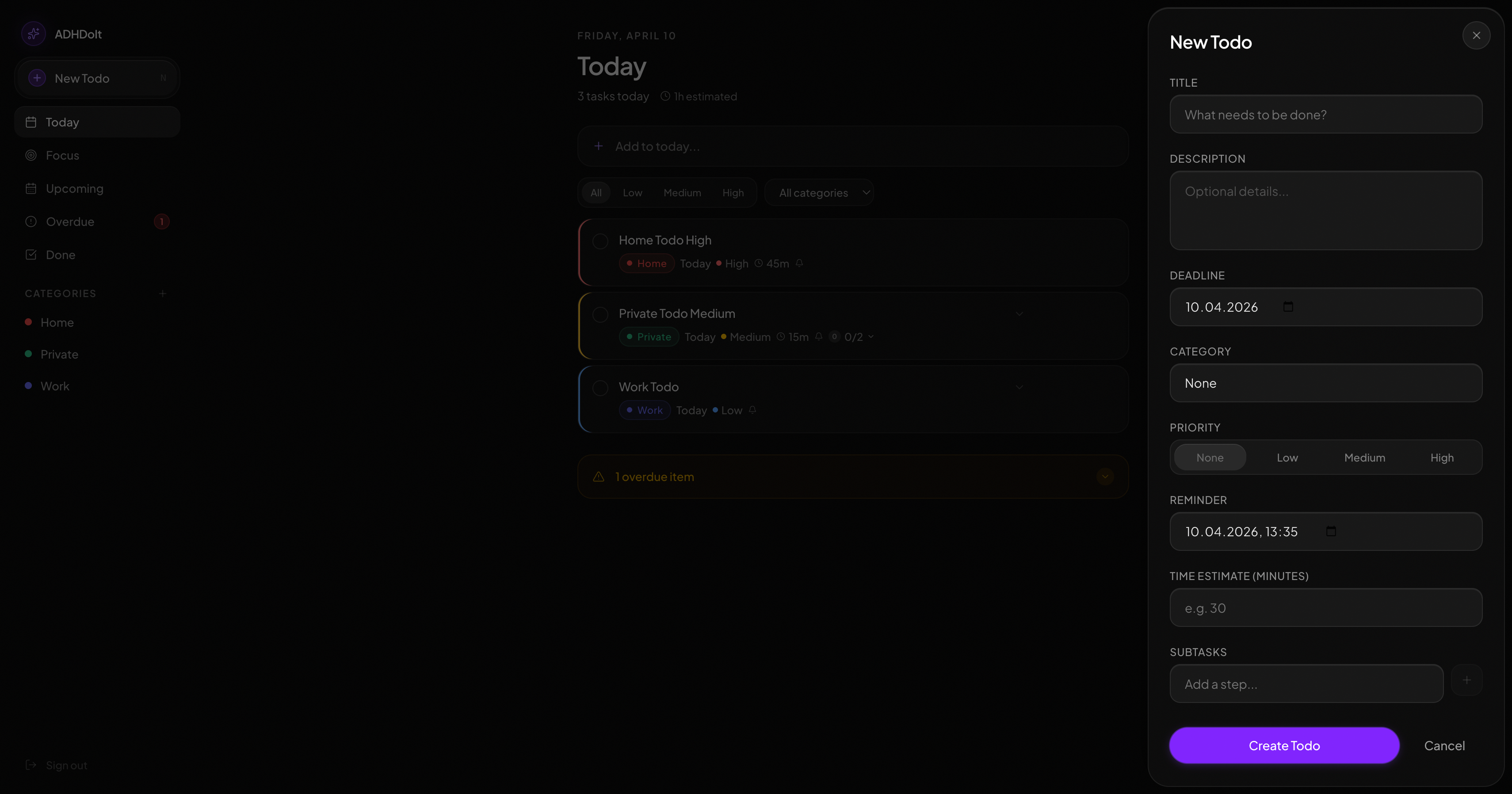
Form fields: Title (required), Description, Deadline (defaults to today), Reminder, Category, Priority, Time Estimate, Subtasks.
Task Cards
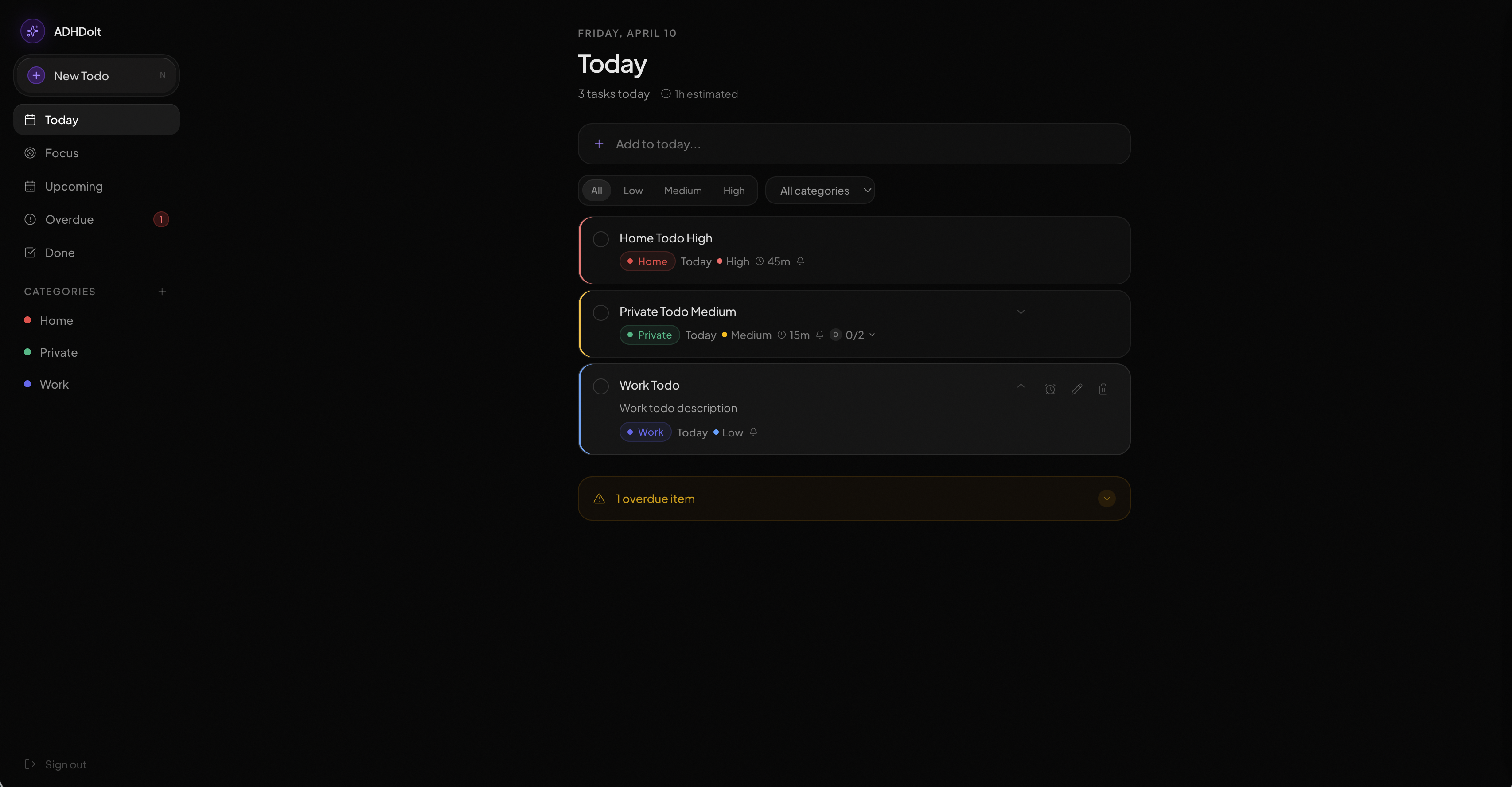
Each card shows: title, category badge, due date, priority border, time estimate, and subtask progress. Click the title to open the edit view. If a task has a description, a chevron appears next to the title — click it to expand inline. Hover to reveal action buttons: bell (reminder), pencil (edit), trash (delete).
Views
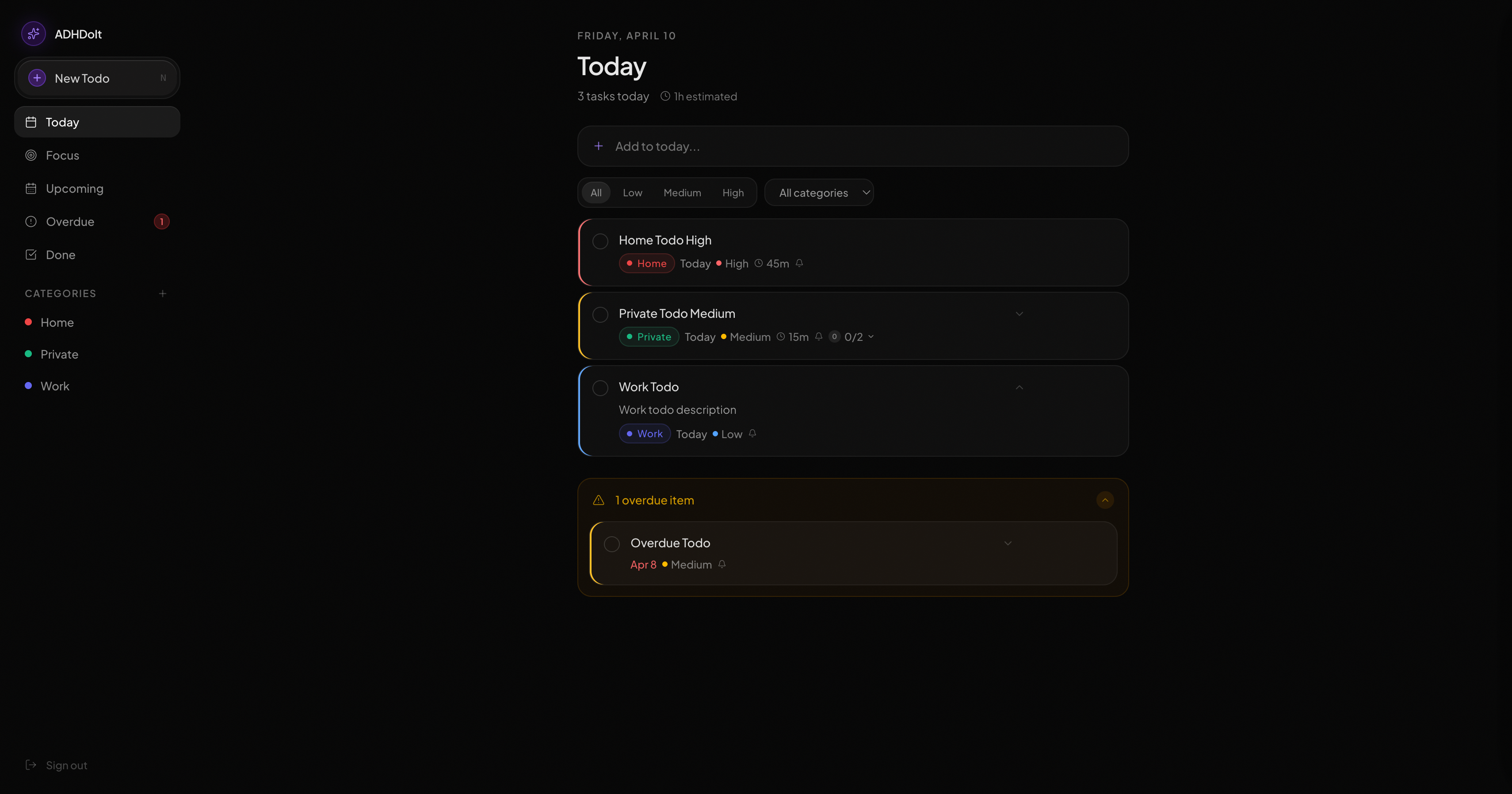
| View | What it shows |
|---|---|
Today |
Active tasks due today. Overdue tasks appear in a collapsible section at the bottom — they stay visible but don’t crowd the list. |
Upcoming |
Active tasks with a future deadline, grouped by date. |
Overdue |
Everything past its deadline. Dates show in red. Reschedule, complete, or delete from here. |
Done |
Completed tasks with total done, done today, and current streak. |
Category |
Tasks in a single category. Quick Capture here pre-fills the category. |
Focus Mode
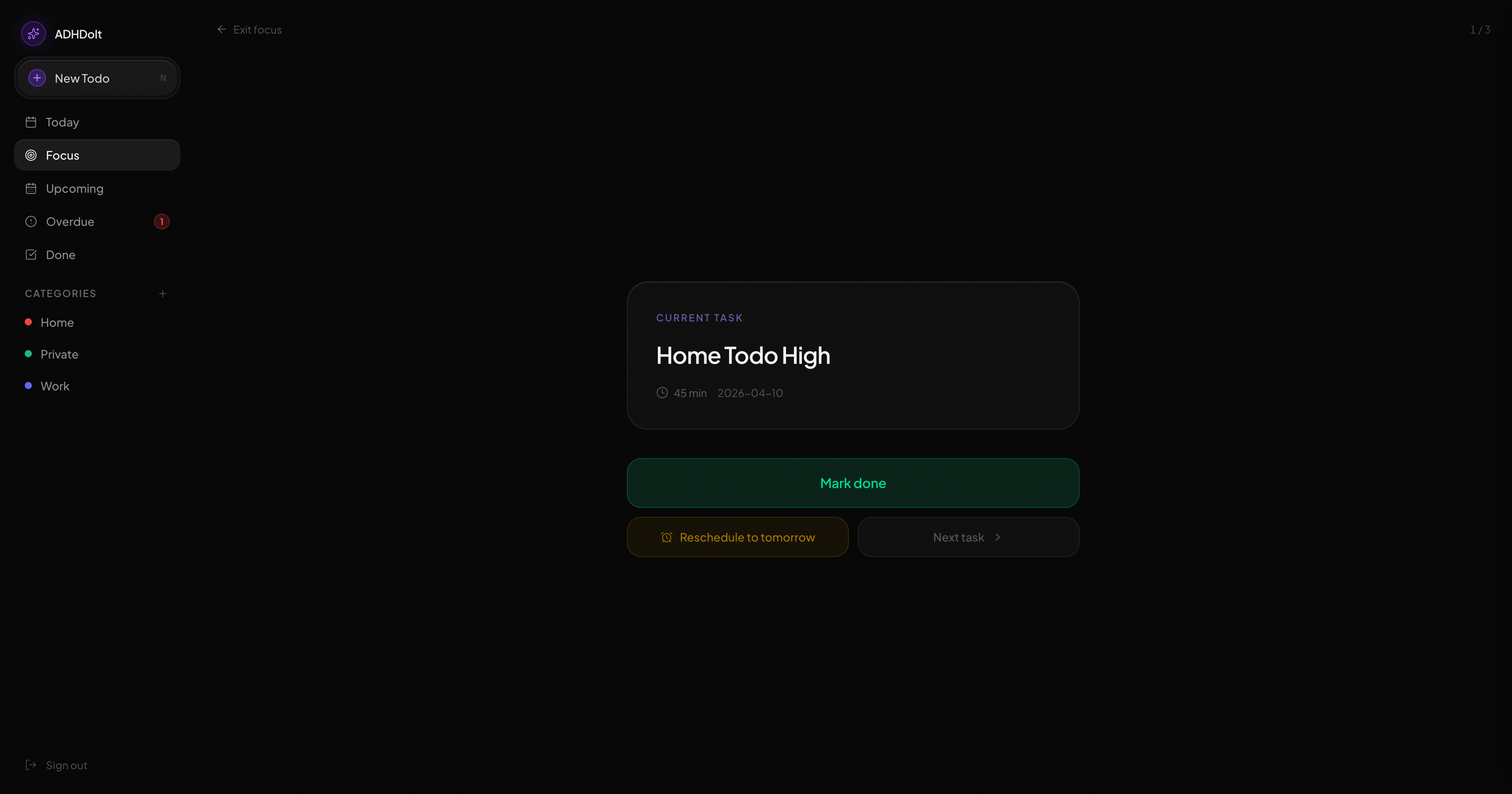
One task, full screen. No sidebar, no list — just what you’re working on right now. Open it from the sidebar at the start of a work session.
Subtasks appear as checkboxes. When you’re done, hit Mark done to advance to the next task, or Reschedule to tomorrow if it’s not happening today. The counter (e.g. "1 / 2") shows your position in the queue.
Snooze vs Reschedule
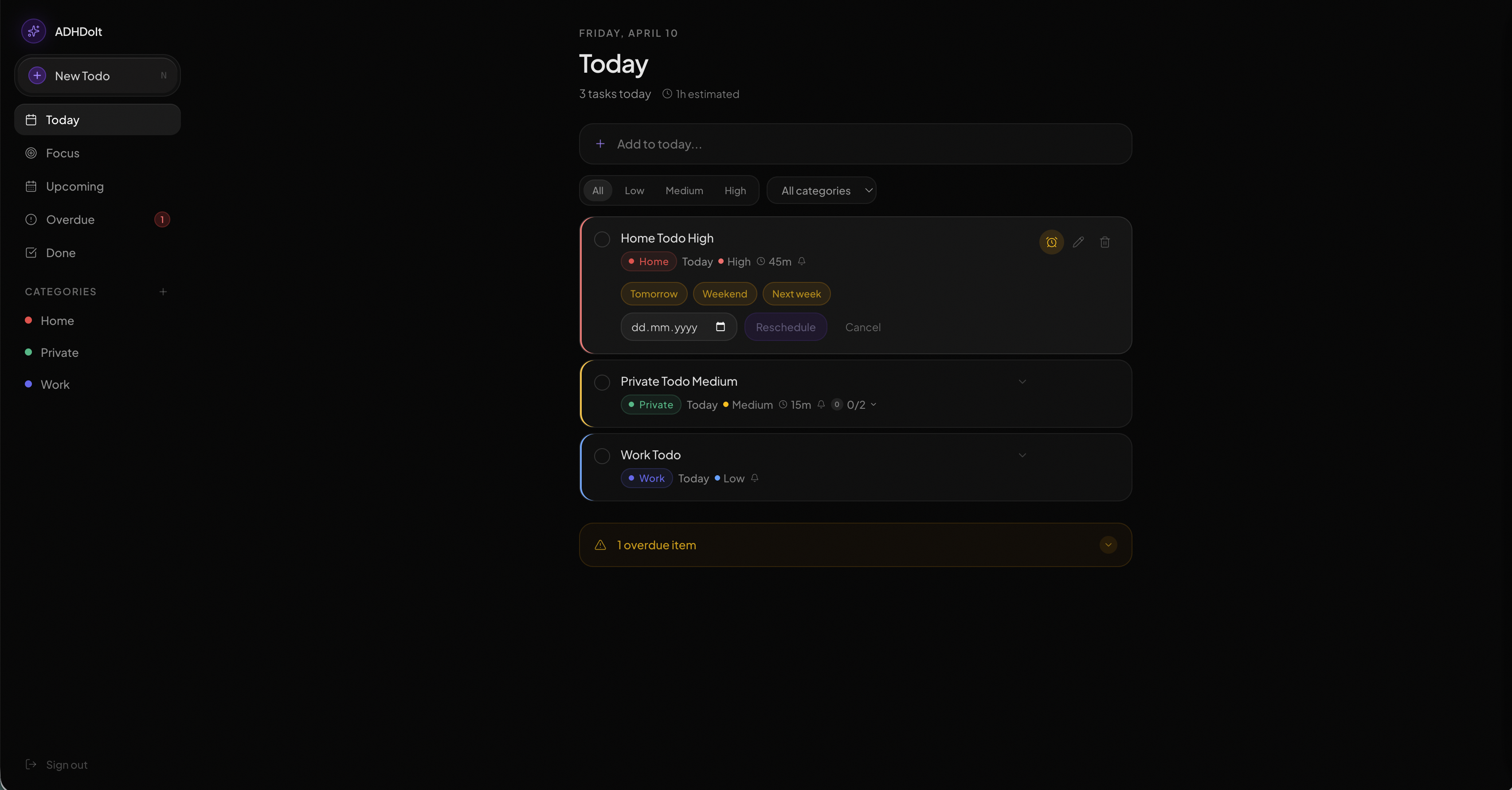
Both push the deadline to a future date. Snooze uses presets (Tomorrow / Weekend / Next week) accessible from the task card. Reschedule opens a date picker. Neither changes the task’s status — it stays active and reappears in the appropriate view on the new date.
Reminders
Set a reminder_at datetime when creating or editing a task. Both email and browser push notifications fire at that time. The form defaults to one hour from now — clear it if you don’t want a reminder.
To receive browser push notifications, allow notifications when prompted on first login.
| Rotating your VAPID keys (server-side) invalidates all existing push subscriptions. Users will need to log out and back in to re-subscribe. |
Priority and Colour Coding
| Indicator | Meaning |
|---|---|
Red left border |
High priority |
Yellow left border |
Medium priority |
Red date |
Overdue |
Purple |
Primary actions / active navigation |
Admin Dashboard
Users with the admin role have access to an Admin section in the sidebar.
Users
The user table lists every registered account with their name, email, and current role. From here an admin can:
-
Change role — click the role badge next to a user to switch between
userandadmin. You cannot change your own role. -
Delete user — removes the account and all its data permanently. You cannot delete your own account.
Settings
| Setting | Effect |
|---|---|
Disable sign-up |
Prevents new accounts from being created. Existing users and admins are unaffected. Toggle it back off to re-enable registration. |
The first admin must be set directly in the database: UPDATE users SET role = 'admin' WHERE email = 'you@example.com';
|
Keyboard Shortcuts
| Key | Action |
|---|---|
N |
Open new task form |
Escape |
Close form / clear Quick Capture input |